
AI
What to do when AI builds your design wrong
You described it clearly. You even included a screenshot. And the AI built something that looks fine. But not right. Here's how to close the gap between intent and output.

Written by
Björn Rutholm
Yesterday I needed a git graph in a UI. You know the type - those beautiful branch visualizations you see in Sourcetree or GitKraken. Colored lines flowing down the screen, commits as dots, branches forking and merging. A DAG visualization, if you want the fancy term (Directed Acyclic Graph - but let's not go there).
So I did what any self-respecting designer-developer hybrid would do. I told my AI agents to build one from scratch.
And they struggled. Hard.
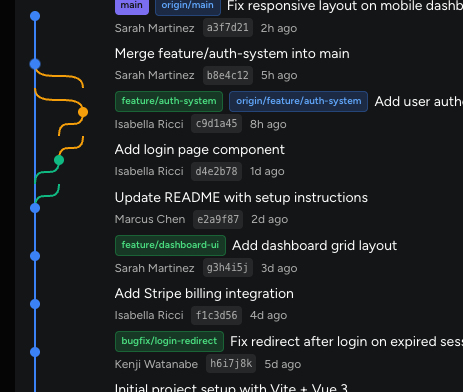
Getting the swim lanes right, the curves between branches, the spacing, the commit messages aligned properly - it's deceptively complex. What looks like a simple visual is actually a gnarly layout algorithm problem underneath. We went back and forth, tweaked, broke things, tweaked more.
Then I stopped and asked myself a question - "Has someone already solved this?"
A quick conversation later with my AI agents, I had my answer. Not only had someone solved it - there were multiple battle-tested, open-source libraries purpose-built for exactly this:
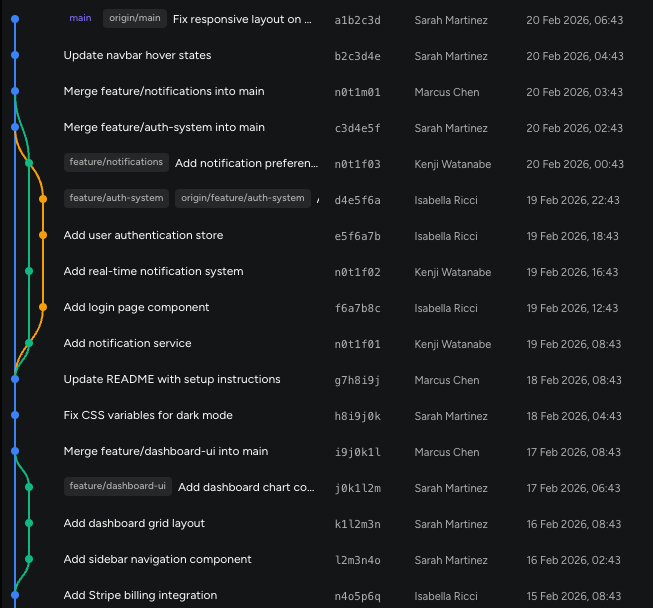
Mermaid's gitGraph - the one we ended up using. Mermaid lets you describe a git history in plain text and renders it beautifully. Five lines of code, done. It's actively maintained with 86k+ stars on GitHub, and it doesn't just do git graphs - flowcharts, sequence diagrams, Gantt charts, you name it. One library, dozens of diagram types.
I went from "I'm starting to feel a bit frustrated" to "it works and it looks professional" in about five minutes. The library handled the lane assignment algorithm, the curve rendering, the responsive layout - all the hard parts we were banging our heads against.
And all I had to do was some minor tweaking to align it with our design system.
Here's the thing. This isn't really a story about git graphs. It's about a pattern I see designers fall into all the time, myself included.
We encounter something that feels like "developer territory" and we do one of two things: we either avoid it entirely, or we try to build it from zero. Both are wrong (or at least a big waste of time).
The developer ecosystem - npm, GitHub, open-source libraries - is an absolute goldmine for designers. And most designers have no idea it exists, or they think it's not for them.
Let me give you some examples of what's out there, ready to use:
Data visualization: You don't need to design a charting system from scratch. Recharts, Chart.js, D3 - these libraries have spent years perfecting responsive, accessible, animated charts. Your job as a designer isn't to reinvent the wheel. It's to know these exist and to style them to match your design system.
Diagrams and flowcharts: Need to render a user flow, a system diagram, or an org chart? Mermaid, React Flow, Dagre - they handle the layout algorithms so you can focus on the visual language.
Animations: Motion (formerly Framer Motion), GSAP, Lottie - each solves a different animation challenge. Knowing which one to reach for is a design skill, not a coding skill.
Rich text editing: Building a content editor? Tiptap, Slate, Lexical. Don't start from scratch. You'll be six months in and still fighting cursor positioning bugs.
The pattern is always the same: the hard problem has already been solved (almost always). Your value as a designer is in knowing it exists, understanding its capabilities, and making it beautiful.
This requires a fundamental change in how you think about your craft. Traditional design education teaches you to create everything from a blank canvas. And that's beautiful for visual work - layout, typography, color, illustration.
But modern product design doesn't happen on a blank canvas anymore. It happens in systems. And those systems have building blocks that are freely available if you know where to look.
And maybe even more important. Modern product teams move at a rapid pace. You can either be the designer that spends weeks on research and discovery - or the designer that ships something that can be tested in an afternoon.
The designers who are leveling up the fastest right now aren't the ones with the best Figma skills. They're the ones who have learned to navigate the developer ecosystem and pull in the right tool at the right time.
Think of it this way: a chef doesn't grow their own wheat to make bread. They source the best flour they can find and focus their energy on what makes their bread unique. The ingredients exist. Your job is the recipe.
Here's what you can do today to get started with GitHub as a designer:
The git graph was my reminder this week. Hours of frustration, solved in five minutes by knowing the ecosystem. Don't build what already exists. Find it, learn it, make it yours.
That's the play.
Written by
Björn Rutholm
Founder of PixelPappa
Technical cofounder for hire. Product designer and developer helping teams build digital products that work.
You described it clearly. You even included a screenshot. And the AI built something that looks fine. But not right. Here's how to close the gap between intent and output.
A new traveler app for Infospread that led to four new framework agreements upon launch.
A look at the design process behind SPF Mötesglädje. National app helping seniors combat loneliness.
Insights, case studies, and updates from PixelPappa.